Votre choix s’applique sur cette page, mais le navigateur n’a pas permis de l’enregistrer. Nous pourrons vous le demander à nouveau lors de votre prochaine visite.
▷Vidéo YouTube
Pour lire cette vidéo, activez les médias externes dans les paramètres des cookies.
Imagine ChatGPT, but with direct access to all of your chapter’s knowledge, applications, and internal systems, so
you can ask them anything related to your data.
For example:
What events are happening next week?
Who in our chapter can help me with legal issues?
What’s the dress code for tonight’s social?
Who in our chapter likes yoga?
Did anyone in our chapter graduate from Harvard University?
etc.
This is possible with a CogniVis
AI - a powerful AI system that allows you to connect over 50 leading business apps (like
Google Drive, Dropbox, Hubspot) to AI.
What's more - with regular ChatGPT you can only use OpenAI GPT models, but with CogniVis AI you are not limited to
one provider. With one click you can switch between GPT, Claude, Gemini, LLama and basically any LLM of
your choice.
An by the way - if you need full control over your data you can even host it on your own servers,
on-premise.
Let's look at some usage examples
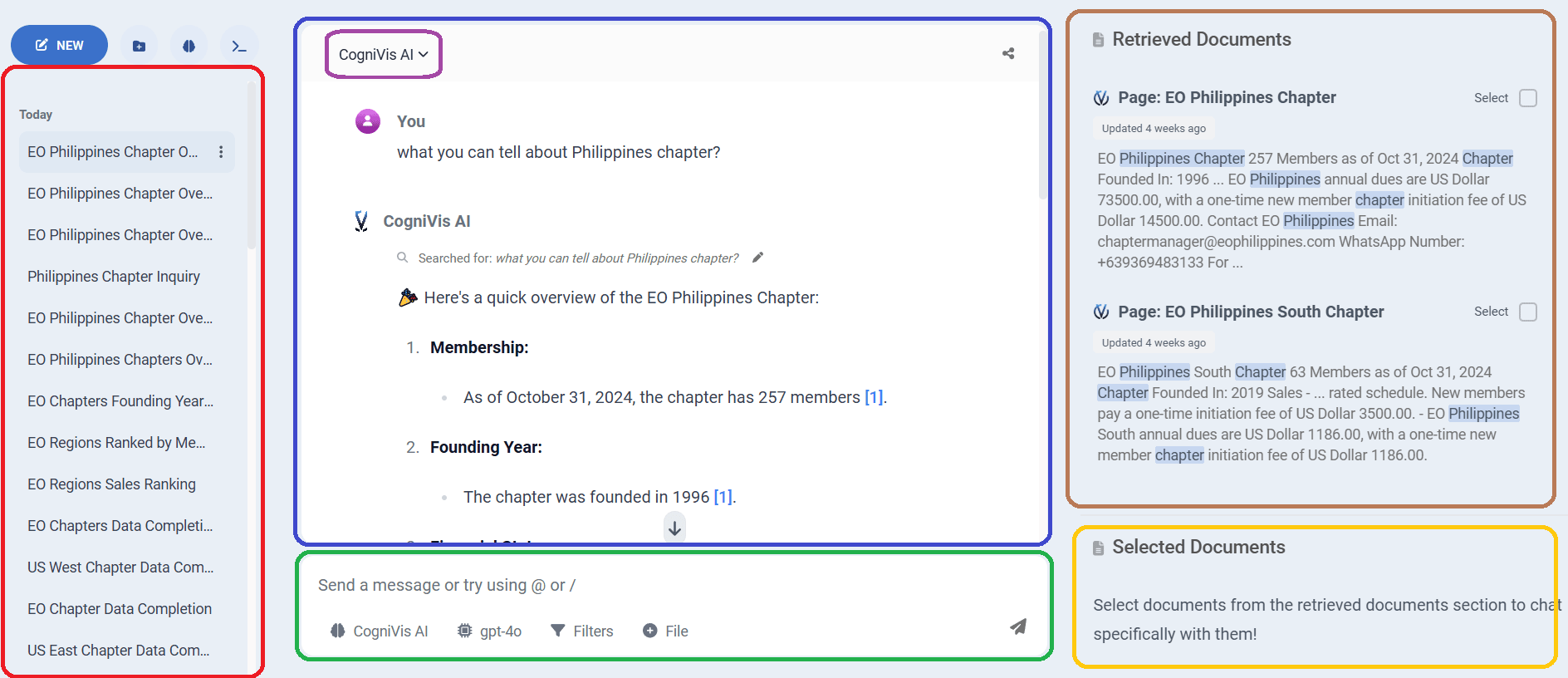
Question: "What you can tell about Philippines chapter?"
Let's take a closer look at this:
I. On the left side in red is the chat history.
II. In the middle highlighted in blue there is the actual chat where we talk to the
AI.
III. In the top left corner of the middle section, highlighted in purple there is a
dropdown menu with Assistants.
Assistants (also called personas),
are
personalized versions of the chat that operate and respond in a specific way as instructed. By default, we have
three assistants at our disposal:
GPT - a chatbot with only general knowledge, exactly the same as ChatGPT
Paraphrase - this chatbot will operate solely on the information found in the sources you have
attached (for example, in your knowledge base) and will not add any additional information on its own
CogniVis - a mix of the two above. This chatbot operates on both the sources you have attached
and also uses its general knowledge to try to give the best answer using both
You can create your own assistants, and I'll explain how to do that in other articles. It's an
incredibly helpful feature that I can't imagine my daily work without now.
If you send a message to the chatbot without selecting a specific assistant, it will default to the
CogniVis assistant.
IV. At the bottom in green you can find a message box where you type your prompts
for the AI. Below there are also filtering buttons, so you can specify what assistants, models or data sources you
want to use. There is also a button to upload a file, however you can also simply drag and drop it in the message
box.
V. On the right side in brown you can see the documents that AI used to give you an
answer. This is
extremely important because it allows you to easily verify the chatbot's response. You can click on the source and
you will be taken to it if, for example, you want to investigate a particular issue more closely.
V. In yellow on the right side we see the documents that we have marked for the
chatbot
to rely on
exclusively in the current conversation.
Advantages over WhatsApp
Using AI for your chapter on WhatsApp is great, but it comes with few disadvantages.
The most popular choice among chapters in EO and YPO is to use AI bot on WhatsApp, because it's usually a main
channel of communication between members.
So, using AI for your chapter on WhatsApp is great, but it comes with few disadvantages. I personally prefer to
use it directly in a CogniVis AI chat and I recommend the same the all the chapters that ask us about AI
implementation. Why?
Here are the main reasons:
Personalized User Accounts
In CogniVis chat, each chapter member can have their own account, offering greater privacy and customization
tailored to individual needs.
Conversation History for Each User
CogniVis keeps conversation histories separate for each user, allowing for easier tracking and personalized
interactions.
Enhanced User Interface
CogniVis provides a more intuitive and convenient interface, ensuring a smoother and more enjoyable user
experience.
Improved Readability
Unlike WhatsApp, where formatting options are limited, CogniVis allows for better readability of long AI
responses with advanced formatting.
Customizable Private Assistants
Users can create their own private AI assistants in CogniVis, offering personalized help and more focused
responses.
Verified Responses with Retrieved Documents
CogniVis makes it easier to verify AI responses by using the "Retrieved Documents" section, allowing access
to all of the original sources.
Citations for AI Responses
CogniVis includes citations for specific parts of AI responses, making it easier to verify the sources and
ensuring greater transparency of the information.
Focused Conversations with Document Sets
You can select specific documents or sets of documents to interact with, ensuring your chat stays on topic.
AI Response Feedback
Users can provide feedback on AI responses in CogniVis, helping the system learn and improve over time.
Conversation Export and Sharing
CogniVis offers useful features like copying, exporting, and sharing conversations, making it easy to
collaborate or review past chats.
Contextual Conversations
CogniVis can preserve context across multiple interactions, allowing users to ask follow-up questions.
WhatsApp only supports single-shot queries.
File Upload and Generation
Users can upload files and generate new ones within CogniVis, streamlining workflows and improving
functionality.
Graphics and Chart Generation
CogniVis enables the generation of charts and graphics directly within the chat, enhancing data
visualization.
Easy Switching Between Assistants
You can effortlessly switch between different language models (LLMs) or custom assistants within CogniVis,
giving you more flexibility.
Advanced Data Filtering
CogniVis allows users to filter data based on various criteria, including data source, date, and tags,
making it easier to find relevant information.
Let's compare the same prompt written on the WhatsApp and in the CogniVis chat.
Prompt: "Provide a sample 5% reflections"
While the quality of content is similar, the readability of responses in CogniVis chat is significantly better.
Prompt: "Provide a sample 5% reflections"
To sum it up in a nutshell - using bot on WhatsApp for your chapter is great, but if you want to take AI for your members to another level - use CogniVis AI chat.
CogniVis allows you to connect your data sources to various LLMs, create custom AI
assistants, and deploy them on WhatsApp, Slack, your website, or seamlessly
integrate them into your applications and systems for use anywhere you need.
The founders of the company behind CogniVis AI ( Michal Szymanski and Dawid
Adach ) are members of EO
Poland and offer this solution
free of charge to EO and YPO chapters as part of their
commitment to the community.
There are no hidden costs that CogniVis AI charges EO and YPO chapters.
There is also no other purpose than to help chapters who have approached
us for help with implementing AI.
We provide our software and time for free, aiming to contribute to the
growth of our entrepreneurial community.
How to implement it
Contact Michal Szymanski from EO Poland and he will guide you and your chapter through the
CogniVis AI implementation process.
Author of hundreds of articles on AI, programming, UI/UX design,
business, marketing and productivity. In the past, an educator working
with troubled youth in orphanages and correctional facilities.