
Jira IA
Introduction
What is Jira?
Jira is a project management and issue-tracking tool developed by Atlassian. It helps teams plan, track, and manage work by providing features for bug tracking, task management, and agile project management methodologies like Scrum and Kanban. Ideal for software development and IT teams.
What is CogniVis AI?
CogniVis AI is a platform that enables you to pull data from different
sources and combine them with each other to
create practically useful AI tools. Sources may include
your internal company knowledgebase and a variety of
most popular business apps like GitHub, Jira, Slack,
and more.
This enables you to easily create
AI chatbot assistants (internal),
custom generators and even
embeddable AI chat widgets trained on your data.
How CogniVis AI works with Jira?
The Jira Connector picks up all Issues and Updates from the specified projects.
What exact sources are pulled:
- Issues
- Issue title
- Issue description
- Issue status (Open, In Progress, Closed)
- Issue assignee
- Issue comments
- Issue URL
- Attachments
- Sprint name
- Sprint goal
- Sprint start date
- Sprint end date
- Sprint URL
- Projects
- Project name
- Project key
- Project lead
- Project URL
Configuration
Generate a Personal Access Token
To connect CogniVis AI with Jira, you need to generate a Access Token in Jira. This token will be used to authenticate the connection between CogniVis AI and Jira. See the detailed instructions in the:
Jira Cloud Access Tokens guide
Jira Server Personal Access Tokens guide
Sign In
Sign into your Jira account.
Navigate to Token Settings
Go to your Profile. In the navbar, click Security and then select Create and Manage API Tokens.
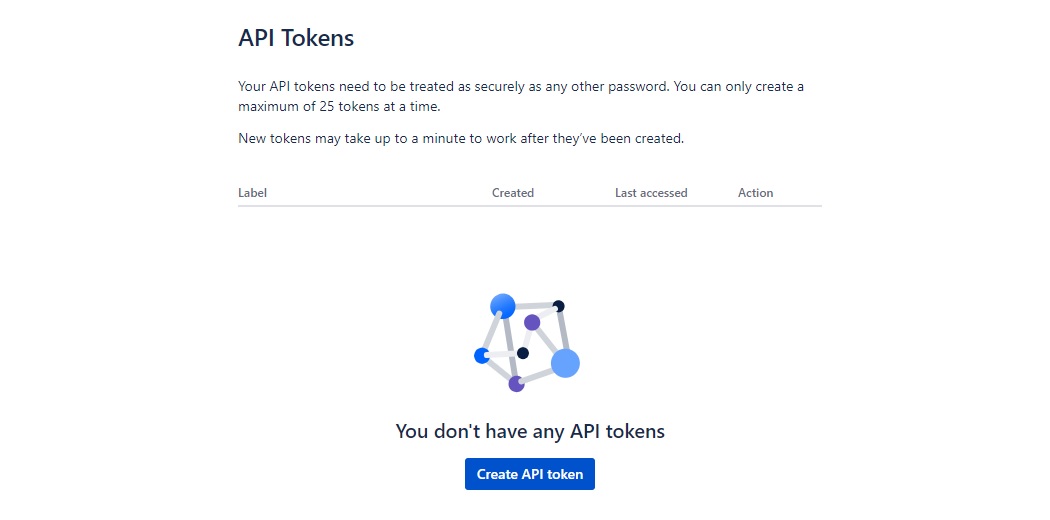
Open token generation pageGenerate a new token
Click on Create API token button
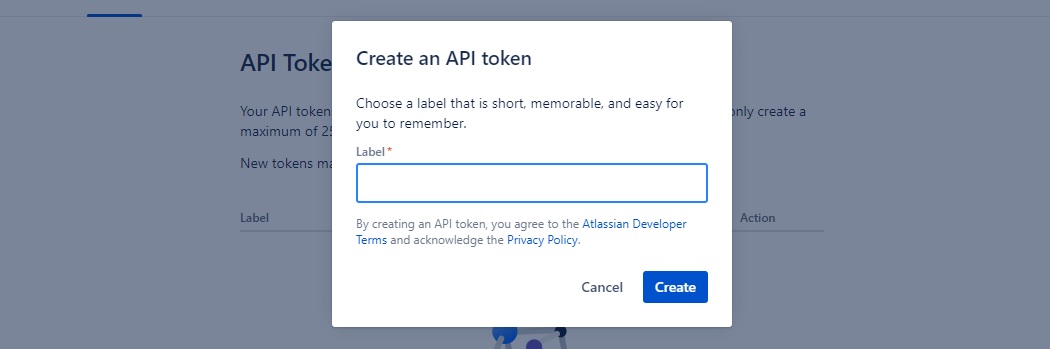
- Name your token something like "CogniVis Connector".
Add the connector to CogniVis
Navigate to CogniVis Connectors
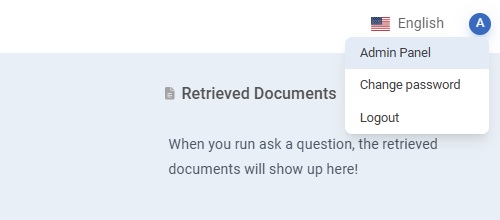
In your platform, go to the Admin Panel, which you can find in the top right corner of the screen.
Go to the Add Connector section in the menu on the left side of the screen.
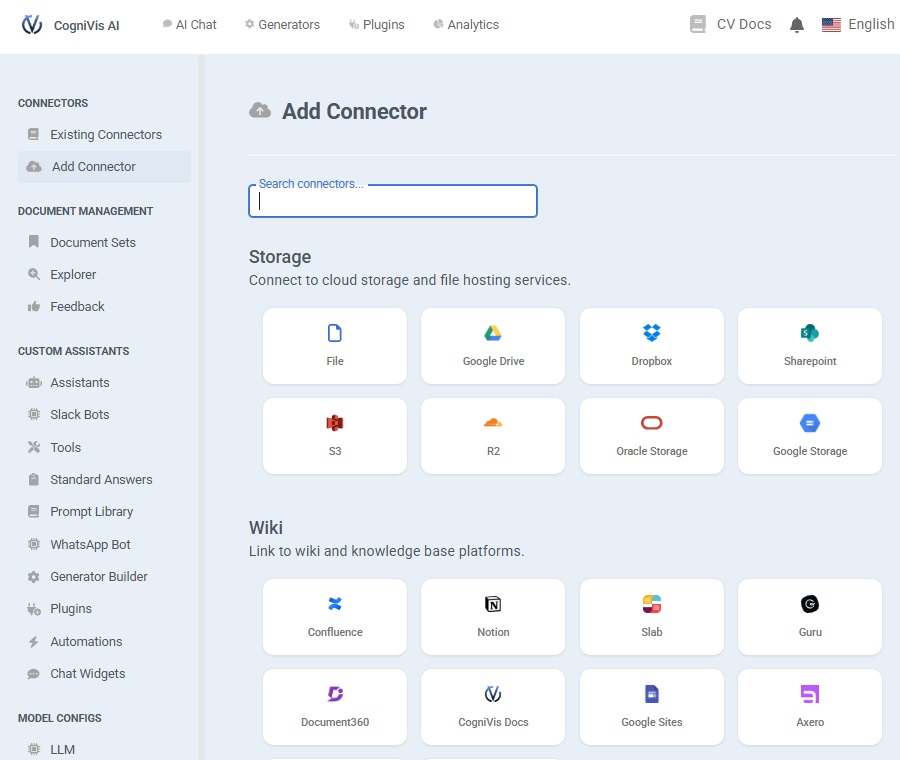
Then, search for and select the Jira connector.
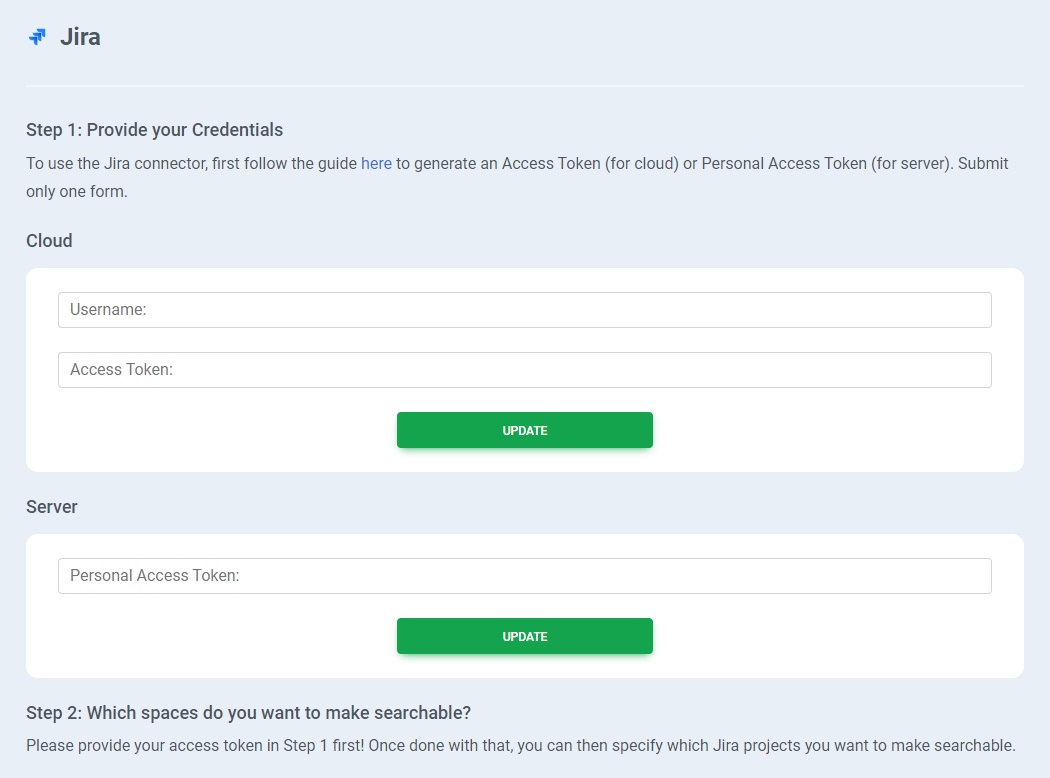
Add your Jira token
Please provide the email used in Jira, the Jira access token and click on the "Update" button.
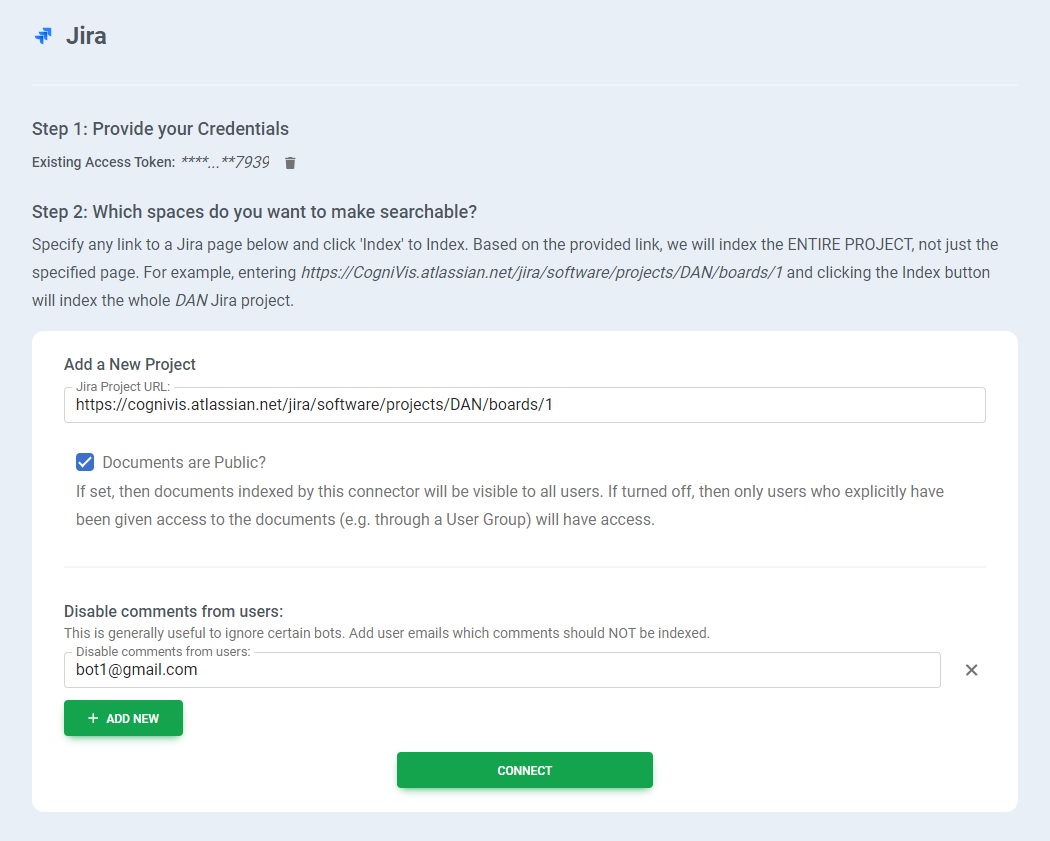
Specify the repo
For indexing each project, supply a single URL to any page within the project. Additionally, you can specify which user comments to exclude (which is useful for ignoring comments from specific bots). For example, it might be formatted like this:
Free trial
If you are interested in creating your own automations and workflows with artificial intelligence based on your data, you can request a free trial of our solution. Please book a demo with us to get started.
book a demoOn-premise
Enterprise organizations can choose to deploy this connector on-premise. On-premise deployment provides additional security and privacy, it means that the connector will be hosted on your own servers which you can control and manage.
This option is suitable for organizations that have strict data privacy and security requirements, want to integrate with their existing infrastructure, or need to comply with specific local regulations.
Contact our team & learn about options of deploying this connector on premise.
book a demo learn more about on-premise aiUse cases
Check out potential benefits and use cases for this connector.
Automated Status Reporting
AI can analyze the status of issues and sprints to generate daily or weekly status reports. This eliminates the need for manual reporting, keeping all stakeholders updated on project progress and bottlenecks.
Intelligent Task Assignment
Using issue assignee data and project lead inputs, AI can recommend task assignments based on team members' availability, past performance, and skills. This ensures optimal resource allocation and balanced workloads.
Enhanced Sprint Planning
AI can analyze past sprint goals, start and end dates, and issue completion rates to predict the likelihood of meeting future sprint goals. This helps in more accurate and efficient sprint planning.
Automatic Issue Prioritization
By evaluating issue descriptions, statuses, and comments, AI can automatically prioritize issues according to their urgency and impact. This helps teams focus on the most critical tasks first.
Proactive Risk Management
AI can monitor issue statuses and comments to identify potential risks and alert the project lead before they escalate. This allows for timely interventions and risk mitigation.
Efficient Data Retrieval
AI can leverage project URLs, issue URLs, and attachment data to quickly retrieve relevant information. This makes it easier to find past issues or project details without manual searching.
Enhanced Collaboration
AI can summarize issue comments and provide key insights, making it easier for team members to catch up on discussions and collaborate effectively, even if they join mid-way.
Knowledge Transfer
By analyzing closed issues and their resolutions, AI can create a knowledge base of common problems and solutions. This is invaluable for onboarding new team members and reducing repetitive work.
Custom Notifications
AI can set up custom notifications based on issue statuses, assignees, and project updates. For instance, notifying assignees immediately when an issue is assigned to them or when their task's status changes.
Performance Analytics
AI can track project and sprint performance over time, offering insights into team efficiency, project delays, and areas for improvement. This data-driven approach enhances overall project management and team performance.