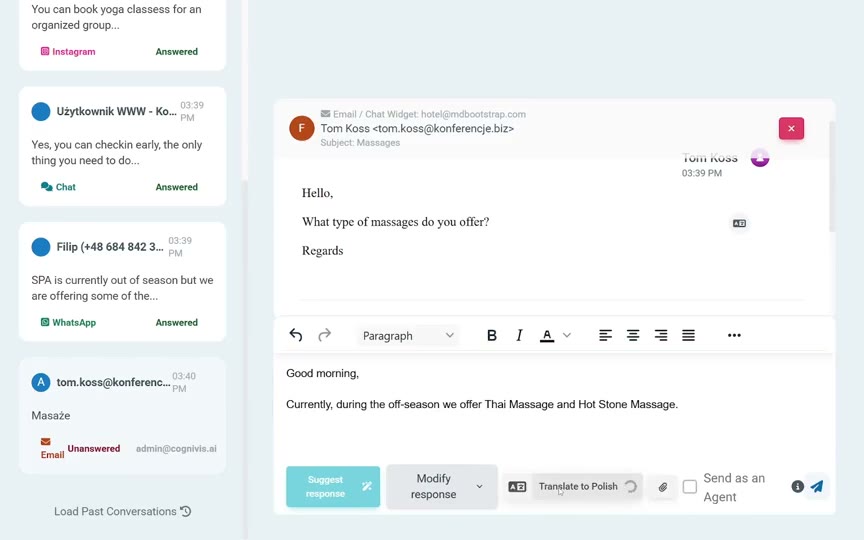
AI will answer most queries instantly. Monitor AI-handled conversations from the dashboard.
Centralised queries
All queries from different channels arrive in one simple dashboard. This ensures that no message is missed, responses remain consistent, and analysing the most frequently asked questions and common topics is much easier.
Escalations
When information is missing from its sources, AI will escalate the conversation to an available member of the guest service team. Escalation can also happen at the guest’s request or in any other situation you define, such as complaints, questions about discounts or group stays.
Availability schedules
Each member of the guest service team has their own availability schedule, with set hours for each day of the week.
Notifications
When a conversation is escalated, the relevant team member receives a notification on their computer or phone.
Contact collection
If no team member is available, AI will ask the guest to leave their contact details, such as an email address and/or phone number, so the team can call or reply later. The contact details are automatically sent to the team along with the full conversation history.
AI translations
Built-in translation enables team members to reply in hundreds of languages.
AI editing
Editing tools enable you to quickly adapt responses, for example by shortening, simplifying or changing their tone.
Analytics
Measure average response times, guest satisfaction, service team performance and much more.
AI in the channels you already use
Automate responses or display suggestions without changing your team’s everyday tools.
Which communication channels can be automated in a hotel?
+
The communication channels most commonly automated in hospitality include email, WhatsApp, Facebook Messenger, Instagram, phone calls and chat on the hotel’s website. With CogniVis AI, most queries from these channels can be handled automatically, significantly improving guest service efficiency.
When will AI escalate a query to a person?
+
AI will escalate a query when it cannot find a reliable and accurate answer in its knowledge sources, when the query requires an individual approach or when the guest explicitly asks to speak to a person. This helps ensure that guests always receive the right assistance.
How long does it take to escalate a query to a person?
+
Depending on the channel and the number of team members available at the time, escalating a query to a person can take between a few and several seconds. The system automatically notifies a team member about the new query, while the guest is informed that the system is finding the right person to help.
What happens if no team member is available?
+
If no team member is available, AI will inform the guest and collect their contact details so that a team member can get in touch later.
Can I set team members’ working hours?
+
Yes. In CogniVis AI, you can set team members’ availability schedules so the system knows when they are available to handle queries. This allows AI to escalate queries automatically only when a team member is available.
How is a team member notified about difficult queries?
+
Team members are notified about new queries through different channels, including email and push notifications in the mobile or desktop app.