Enable only the categories you want. We remember your choice for 180 days across all site languages.

Privacy policy
Skip to content
Platform
CogniVis Platform

Knowledge base

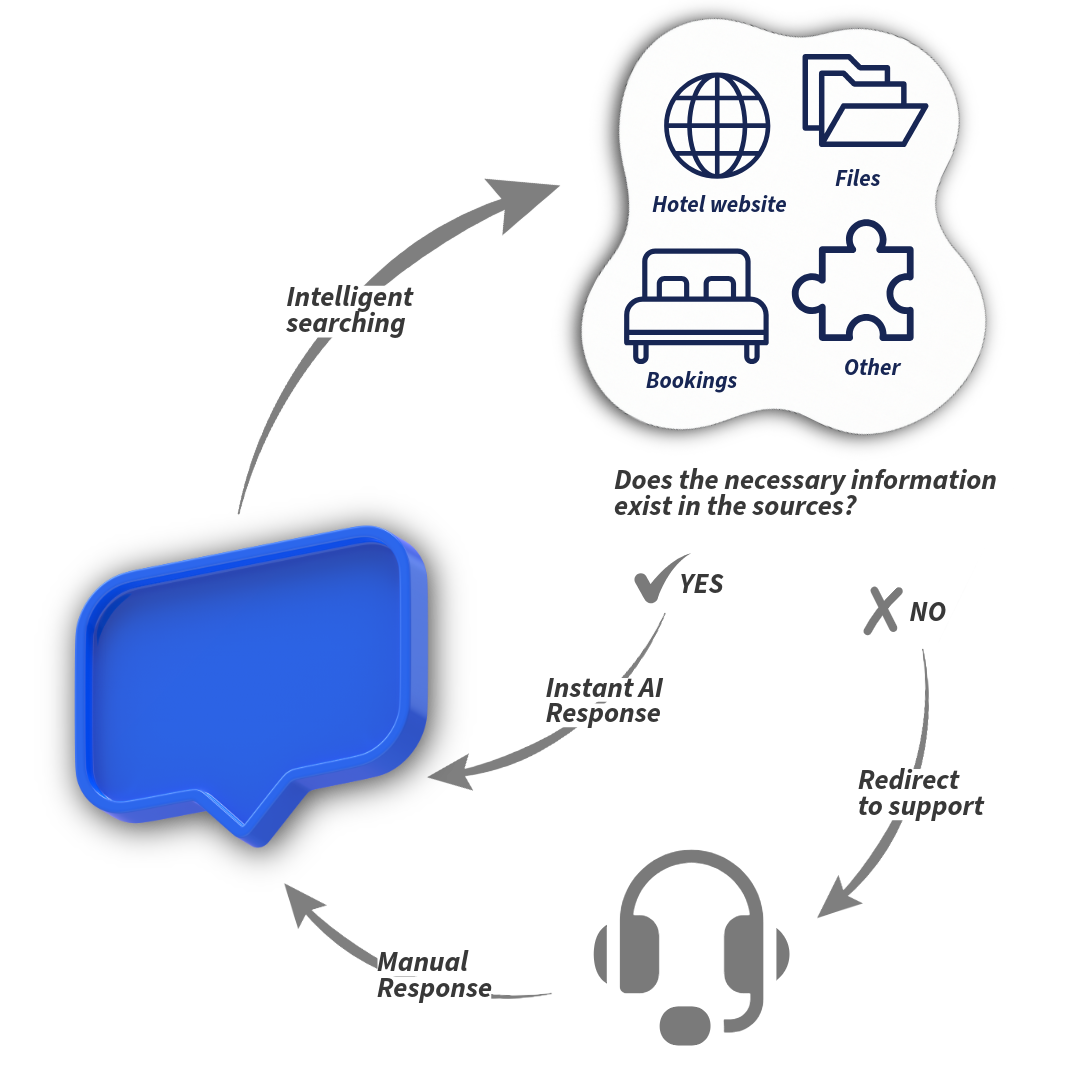
AI uses the hotel’s structured knowledge base to provide up-to-date, relevant and controlled replies.

See how it works

  • Organise knowledge clearly
  • Find information in seconds with AI
  • Edit, translate and generate content with AI
  • Manage access, versioning and change history
  • Use it as an additional knowledge source for the AI handling guest enquiries
  • AI search finds not only knowledge base articles, but also files, websites and other sources integrated with the system
Knowledge baseA clear library of procedures and files, with AI-powered search and sources for each response.Knowledge baseProceduresFilesHotel websiteAsk about your hotel…|123Response with sources

RAG search

CogniVis is built on Retrieval-Augmented Generation (RAG), an approach that combines the power of large language models (LLMs) with precise information retrieval from your own resources. This enables us to provide responses that are not only relevant, but also based on up-to-date, verified data. We have been developing and refining our RAG solution since 2023, with a focus on the specific needs of the hotel industry.

  • No hallucinations thanks to strict contextual grounding
  • Full auditability – we always know where a response comes from
  • Greater relevance through hybrid search and re-ranking
  • Security – permissions control and data masking

Retrieval

Vectorising content and selecting the most relevant passages from the sources.

  • Hybrid search: BM25 + vectors
  • Permission and context filters

Augmentation

Normalisation, deduplication and compression – the model receives only what is relevant.

  • Re-ranking and relevance scoring
  • Protection against data leakage

Generation

Responses created by an LLM, with optional citations and no hallucinations.

  • Citations with paragraph numbers
  • Response mode aligned with company rules

Simplified CogniVis pipeline

  1. User query
  2. Normalisation and semantic expansion
  3. Intent recognition, relevance and permission classification
  4. Hybrid search and re-ranking
  5. Context merging and compression
  6. Generating a relevant response or handing over to a human

Example response

No hallucinationsSource-based
Every bathroom has a hairdryer[1]. These hairdryers are usually wall-mounted or placed in a drawer beneath the washbasin[2]. If you need an additional hairdryer or have any special requirements, please contact the hotel reception, who will be happy to help.
source 1source 2

*Visible source citations are an optional feature that can be disabled after the trial period. Responses will still be based on sources, but without visible citations.

Frequently asked questions

How can I organise my property’s knowledge in the knowledge base?

CogniVis AI offers an intuitive interface for creating and organising articles, categories and tags. You can easily add new information, edit existing content and manage the knowledge base structure, keeping it clear and easily accessible to staff.

How can I search for information in the knowledge base?

CogniVis AI enables fast, effective searches of the knowledge base using advanced natural language processing technology. You can ask questions naturally, and the AI will find relevant articles, documents, website content and other information sources.

Can I edit and generate content using AI?

Yes, CogniVis AI provides tools for editing and generating content, helping you create and update knowledge base articles. You can use AI suggestions to improve the quality and consistency of your information.

Can I create categories available only to selected staff members?

Yes, CogniVis AI lets you manage access to individual categories and articles in the knowledge base. You can specify which information is available to all staff and which is limited to selected people or teams.

Does the knowledge base retain an article’s change history and versions?

Yes, CogniVis AI automatically saves change history and article versions in the knowledge base. You can easily review earlier versions, compare changes and restore previous versions when needed.

Can I export knowledge base articles to PDF?

Yes, CogniVis AI lets you export knowledge base articles in PDF format.

What text-formatting options are available in the article editor?

The CogniVis AI article editor offers a range of text-formatting options, including bold, italics, underlining, bulleted and numbered lists, headings, quotes, links, and the insertion of images and tables. This allows you to create clear, visually appealing articles.

Does the editor support Markdown or a traditional WYSIWYG editor?

The CogniVis AI article editor supports both a traditional WYSIWYG (What You See Is What You Get) editor and Markdown. You can choose your preferred way to edit content, giving you greater flexibility and convenience.