Once you have built a solid foundation in the form of a knowledge base, you can start placing elements
of
artificial intelligence on it.
This is where CogniVis AI comes in, the artificial intelligence module that will act
as the
central brain, connecting different data sources and tools, and allowing artificial intelligence to
operate on them.
CogniVis AI is a powerful, yet simple and intuitive tool to use. Let's start discussing it by looking
at the
interface, which you are probably already familiar with from ChatGPT or other chatbots.
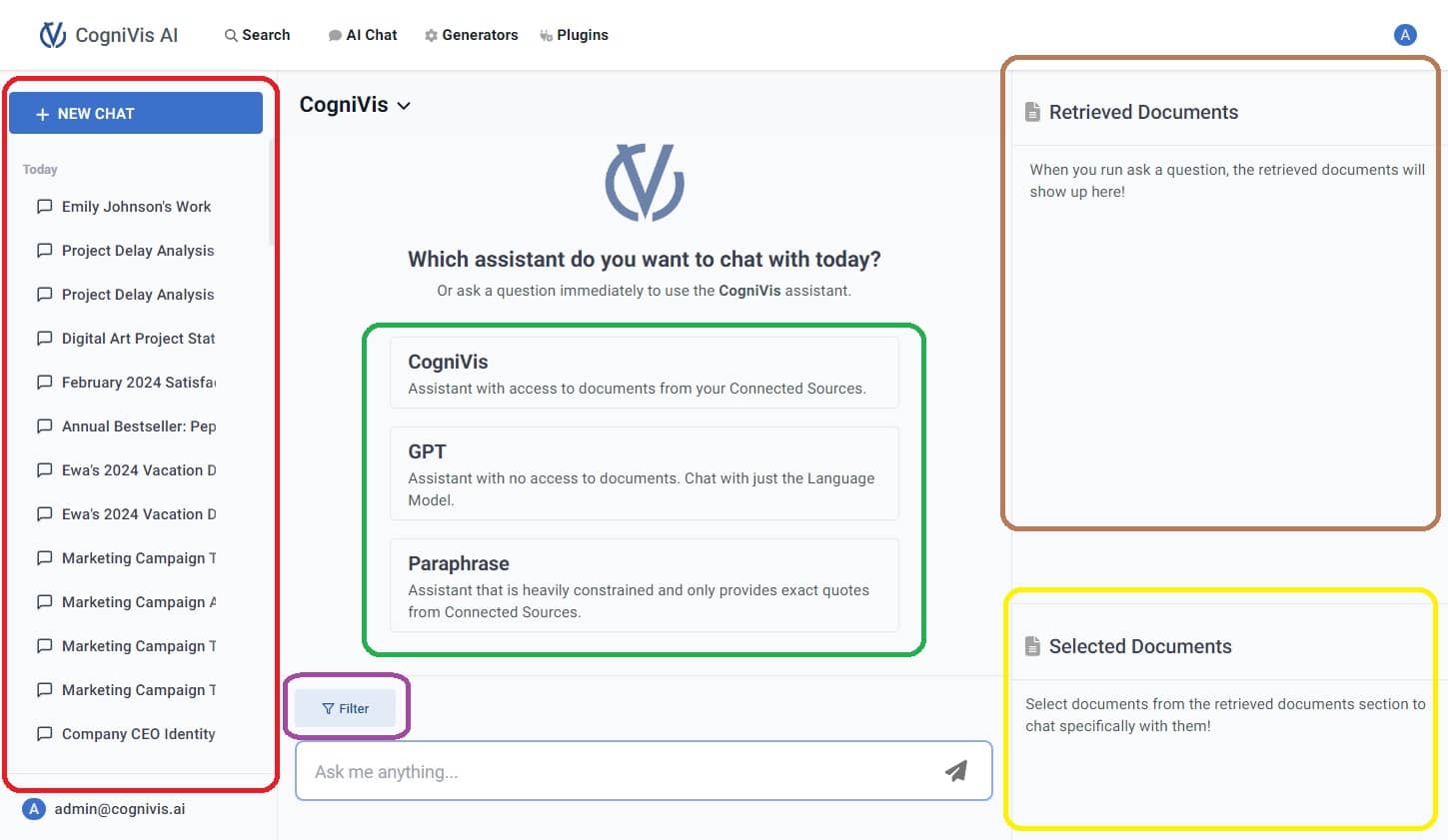
After clicking on the "AI Chat" link in the top navigation, you will see an interface
like this:
Let's discuss each element in turn:
On the left side in red is the chat history.
In the middle highlighted in green are the assistants (also called personas), which
are
personalized versions of the chat that operate and respond in a specific way as instructed. By default, we have
three assistants here:
GPT - a chatbot with only general knowledge, exactly the same as ChatGPT
Paraphrase - this chatbot will operate solely on the information found in the sources you have
attached (for example, in your knowledge base) and will not add any additional information on its own
CogniVis - a mix of the two above. This chatbot operates on both the sources you have attached
and also uses its general knowledge to try to give the best answer using both
You can create your own assistants and in future lessons, I will show you how. This is an incredibly
helpful
feature, without which I now find it hard to imagine everyday work.
At the bottom in purple is the filtering button. Here you can narrow down the sources
that the
chatbot should base its responses on.
On the right side in brown you can see the documents that AI used to give you an
answer. This is
extremely important because it allows you to easily verify the chatbot's response. You can click on the source and
you will be taken to it if, for example, you want to investigate a particular issue more closely.
In yellow on the right side we see the documents that we have marked for the chatbot
to rely on
exclusively in the current conversation.
If you send a message to the chatbot without selecting a specific assistant, it will default to the
CogniVis assistant.
Author of hundreds of articles on AI, programming, UI/UX design,
business, marketing and productivity. In the past, an educator working
with troubled youth in orphanages and correctional facilities.