Docs Book a call
CogniVis AI

  • !Font Awesome Free v7.0.1 by @fontawesome - https://fontawesome.com License - https://fontawesome.com/license/free Copyright 2025 Fonticons, Inc.
    • Übersicht
    • Eigenes LLM hinzufügen
    • Quelle hinzufügen
    • Datensätze definieren
    • Generatoren
  • !Font Awesome Free v7.0.1 by @fontawesome - https://fontawesome.com License - https://fontawesome.com/license/free Copyright 2025 Fonticons, Inc.
    • Überblick
    • Berechtigungen verstehen
    • Rollen definieren
    • Wie man einen Benutzer hinzufügt
  • !Font Awesome Free v7.0.1 by @fontawesome - https://fontawesome.com License - https://fontawesome.com/license/free Copyright 2025 Fonticons, Inc.
    • Überblick
    • Zugang verwalten
    • Inhalte organisieren
    • Anhänge hinzufügen
    • Tastenkürzel verwenden
    • Vorlagen verwenden
    • Inhalte einbetten
    • Mit KI chatten
    • KI befragen
    • KI bearbeiten
    • Mit KI suchen
    • KI-Cover generieren
    • In CV-Dokumente exportieren
    • Automatisierte Berichte erstellen
    • Erweiterungsfeedback sammeln
  • !Font Awesome Free v7.0.1 by @fontawesome - https://fontawesome.com License - https://fontawesome.com/license/free Copyright 2025 Fonticons, Inc.
    • Airtable
    • ClickUp
    • CogniVis Dokumentation
    • Confluence
    • Discourse
    • Document360
    • Dropbox
    • Datei
    • GitHub
    • GitLab
    • Gmail
    • Google Calendar
    • Google Drive
    • Google Sites
    • Google Storage
    • Guru
    • HubSpot
    • Jira
    • Linear
    • Loopio
    • MediaWiki
    • Notion
    • Oracle Storage
    • ProductBoard
    • R2
    • Request Tracker
    • S3
    • Salesforce
    • SharePoint
    • Slab
    • Slack
    • Teams
    • Web
    • Wikipedia
    • Zendesk
    • Zulip
  • !Font Awesome Free v7.0.1 by @fontawesome - https://fontawesome.com License - https://fontawesome.com/license/free Copyright 2025 Fonticons, Inc.
    • Übersicht
    • Antwortstil definieren
    • LLM wählen
    • Wissen definieren
    • Suche verbessern
    • Zeitzone auswählen
    • Startnachrichten hinzufügen
    • ProfitRoom-Tool
    • Bildgenerator
    • Code-Interpretationstool
    • Zugang auswählen
  • !Font Awesome Free v7.0.1 by @fontawesome - https://fontawesome.com License - https://fontawesome.com/license/free Copyright 2025 Fonticons, Inc.
    • Übersicht
  • !Font Awesome Free v7.0.1 by @fontawesome - https://fontawesome.com License - https://fontawesome.com/license/free Copyright 2025 Fonticons, Inc.
    • Übersicht
    • Grundlegende Einrichtung
    • Sprachen auswählen
    • Layout definieren
    • Verhalten definieren
  • !Font Awesome Free v7.0.1 by @fontawesome - https://fontawesome.com License - https://fontawesome.com/license/free Copyright 2025 Fonticons, Inc.
  • !Font Awesome Free v7.0.1 by @fontawesome - https://fontawesome.com License - https://fontawesome.com/license/free Copyright 2025 Fonticons, Inc.
  • !Font Awesome Free v7.0.1 by @fontawesome - https://fontawesome.com License - https://fontawesome.com/license/free Copyright 2025 Fonticons, Inc.
  • !Font Awesome Free v7.0.1 by @fontawesome - https://fontawesome.com License - https://fontawesome.com/license/free Copyright 2025 Fonticons, Inc.
    • Grundkonfiguration
    • Installation
    • Booking
    • Google Maps
    • Kurzurlaub
    • Travelist
    • Tripadvisor
  • outlook
    • Grundkonfiguration
    • Installation
    • Loslegen
  • Thunderbird
    • Grundkonfiguration
    • Installation
    • Loslegen
  • !Font Awesome Free v7.0.1 by @fontawesome - https://fontawesome.com License - https://fontawesome.com/license/free Copyright 2025 Fonticons, Inc.
    • Übersicht
  • !Font Awesome Free v7.0.1 by @fontawesome - https://fontawesome.com License - https://fontawesome.com/license/free Copyright 2025 Fonticons, Inc.
  • !Font Awesome Free v7.0.1 by @fontawesome - https://fontawesome.com License - https://fontawesome.com/license/free Copyright 2025 Fonticons, Inc.
    • Einfache Erinnerungen
    • Seitenänderungen verfolgen
    • Google Analytics verfolgen
    • Search Console verfolgen
    • Benutzerdefinierte Quellen
    • Google Analytics
    • Search Console
    • Chat-Widget
    • Slack-Bot
    • WhatsApp-Bot

Introduction

What is Connector?

Connector is a software tool that allows different systems, applications, or devices to communicate and share data seamlessly. It acts as a bridge, enabling the integration of various software components to work together efficiently, ensuring smooth data flow and interoperability within your tech ecosystem.

What is CogniVis AI?

CogniVis AI is a platform that enables you to pull data from different sources and combine them with each other to create practically useful AI tools. Sources may include your internal company knowledgebase and a variety of most popular business apps like GitHub, Jira, Slack, and more.

This enables you to easily create AI chatbot assistants (internal), custom generators and even embeddable AI chat widgets trained on your data.

How do Cognivis AI connectors work?

Cognivis AI connectors offer support with:

  • Sources
  • Choose specific data sources to index
  • Filter options to include only the data you want
  • Access Configuration
  • Secure access permissions
  • User authorization for data access
  • Fetching Options
  • Frequency of data fetching
  • Data synchronization to ensure up-to-date information

Monitoring Connectors

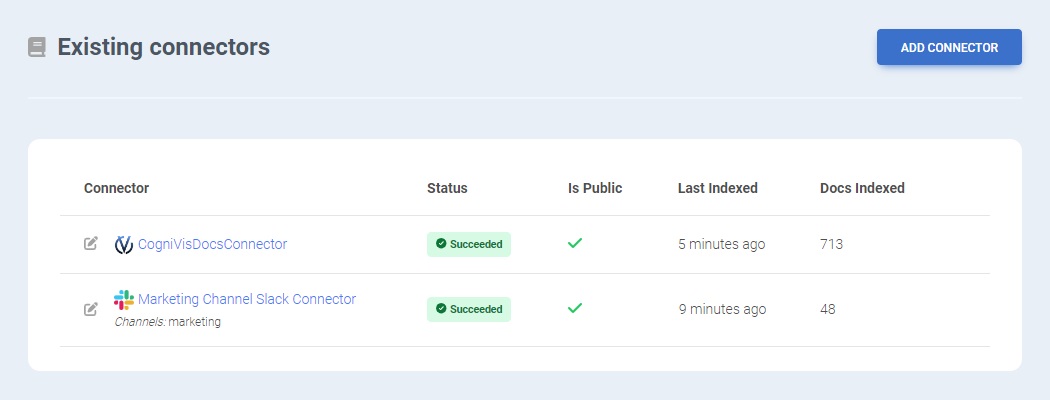
You can monitor Connectors through the Admin Panel, accessible via the profile icon at the top right. The Status page provides an overview of which sources have been indexed and the progress of ongoing indexing tasks.

Free trial

If you are interested in creating your own automations and workflows with artificial intelligence based on your data, you can request a free trial of our solution. Please book a demo with us to get started.

book a demo

On-premise

Enterprise organizations can choose to deploy this connector on-premise. On-premise deployment provides additional security and privacy, it means that the connector will be hosted on your own servers which you can control and manage.

This option is suitable for organizations that have strict data privacy and security requirements, want to integrate with their existing infrastructure, or need to comply with specific local regulations.

Contact our team & learn about options of deploying this connector on premise.

book a demo learn more about on-premise ai

Missing a Connector?

Do you need a certain Connector? Feel free to contact us and let us know. (Make sure to see if it's already mentioned.)

  • Introduction
  • Monitoring Connectors
  • Free trial
  • On premise
  • Missing a Connector

CogniVis - AI knowledge base software CogniVis AI

Experten für KI, die Lösungen für die Hotellerie, private Arztpraxen und viele weitere Bereiche entwickeln.

Finde uns

LinkedIn

  • Dawid Adach
  • Michał Szymański

YouTube-Kanal
Subscribe 52K

Mehr

KI-Schulungen für Teams

Danksagungen

Datenschutzrichtlinie

Contact

Termin vereinbaren

Technischer Support


CogniVis

Kijowska 7/49

03-738 Warschau

support@cognivis.ai

© 2025 Copyright: CogniVis